Trade Cockpit
Signal scanning + position sizing + one-click execution. Everything you need in one panel on your chart.
$69 Unlimited license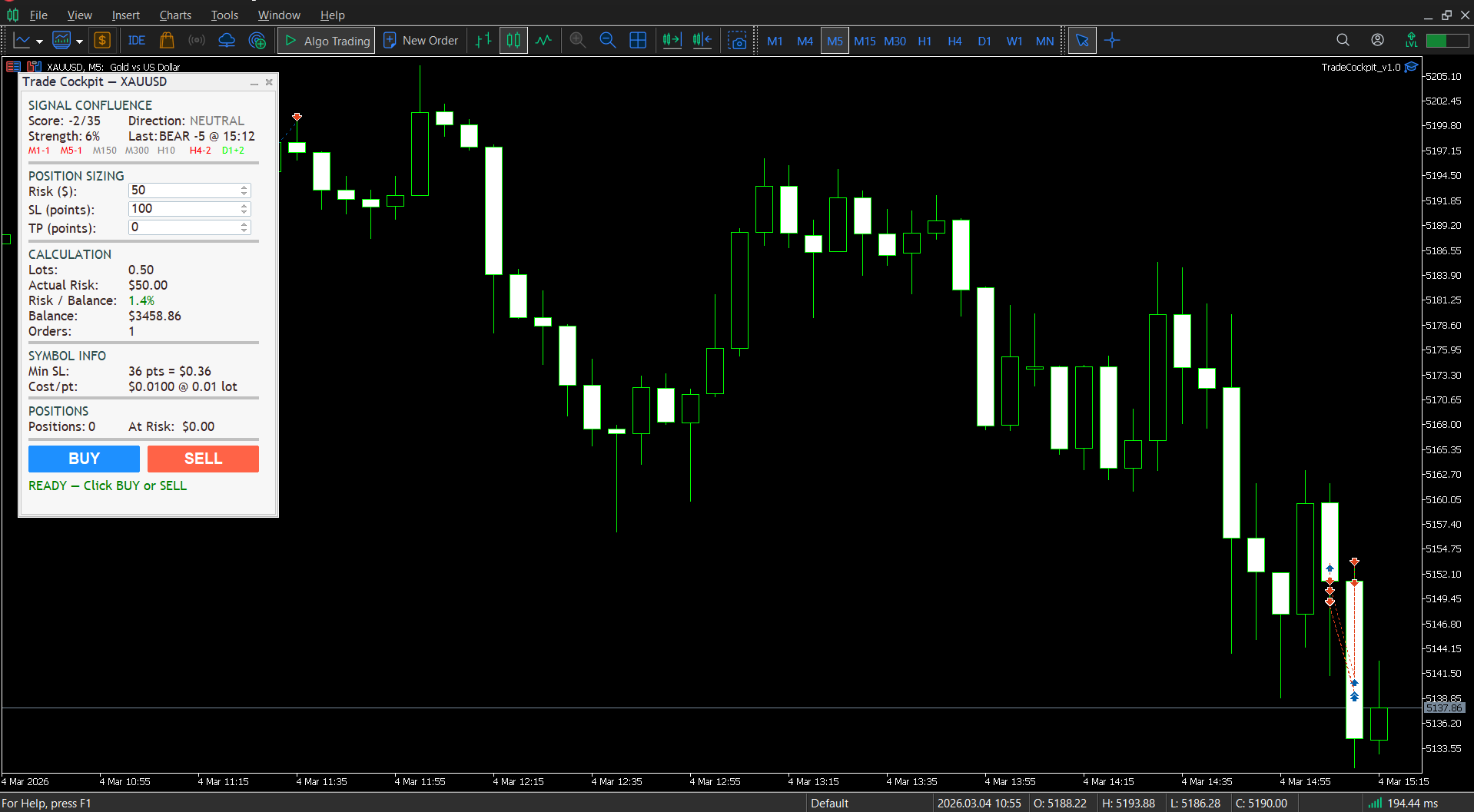
What It Does
Instead of switching between indicators, calculators, and the order window, Trade Cockpit gives you everything in one view: what to trade (signal direction), how much to trade (risk-based lot sizing), and a button to execute.
- 01 Signal Confluence Scanner — Scans 5 indicators (RSI, EMA Crossover, MACD, Stochastic, Bollinger Bands) across 7 timeframes (M1 to D1) to produce a composite score from -35 to +35.
- 02 Position Size Calculator — Enter your risk in USD, set your stop-loss distance, and get the exact lot size using the OrderCalcProfit engine. Works on any instrument.
- 03 One-Click Execution — BUY or SELL with one click. Handles SL placement, TP, minimum stop distance, filling mode detection, and auto order splitting.
- 04 Live Risk Monitoring — See your open positions count, total risk at stake, account balance, and risk-to-balance percentage in real time.
Panel Sections
Signal Confluence
Shows the current composite score, direction (BULLISH / BEARISH / NEUTRAL), signal strength percentage, last signal details, and per-timeframe scores color-coded green (bullish), red (bearish), or grey (neutral).
Position Sizing
Three adjustable fields: Risk in USD, Stop-Loss in points, Take-Profit in points. Use the spin arrows or type values directly.
Calculation
Displays calculated lot size, actual dollar risk, risk as a percentage of your balance, current balance, and number of orders (shows "split" if the position exceeds your broker's max volume).
Symbol Info
Shows your broker's minimum stop-loss distance and the cost per point at minimum lot size.
Signal Engine
The confluence scanner evaluates 5 indicators on 7 timeframes (35 individual scores). Each cell scores +1 (bullish), -1 (bearish), or 0 (neutral):
- RSI — Below oversold level = bullish, above overbought = bearish
- EMA Crossover — Fast EMA above slow = bullish, below = bearish
- MACD — MACD line above signal line = bullish, below = bearish
- Stochastic — Below oversold = bullish, above overbought = bearish
- Bollinger Bands — Price below lower band = bullish, above upper band = bearish
Signals are generated on the confirmed (closed) M1 bar to avoid repainting. Alerts can be sent via desktop popup, push notification, or sound.
Safety Features
- BLOCKED status — If your stop-loss is below the broker's minimum distance, execution is blocked. You cannot accidentally place an invalid trade.
- BLOCKED — Risk > Balance — If your risk amount exceeds your account balance, execution is blocked.
- Over-risk warning — When even the minimum lot size risks more than your target, the panel highlights this clearly.
- Auto order splitting — Lot sizes exceeding your broker's max volume per order are automatically split.
How To Use
- Attach Trade Cockpit to any chart (any symbol, any timeframe).
- Configure your risk — set Risk ($), Stop-Loss distance, and optional Take-Profit.
- Read the signals — the Signal Confluence section shows market state across all 7 timeframes.
- Check the calculation — verify lot size, actual risk, and risk percentage.
- Execute — click BUY or SELL. The status bar confirms your fill.
- Monitor — the Positions section updates in real time.
This is a manual trading utility, not an automated trading robot. It provides signal information and precise position sizing, but you decide when to trade. Works on any instrument MetaTrader 5 supports — Forex, Metals, Stocks, Indices, Crypto, Futures.